
Aerial is an open-source Android TV launcher styled after Apple TV, aimed at China-market televisions such as Xiaomi and TCL sets. According to its GitHub repository, published on 22 October 2026, it has no ads and no recommendation feed, and it takes over the home screen when the TV starts. The project is released under the MIT licence.
What does Aerial change on the home screen?
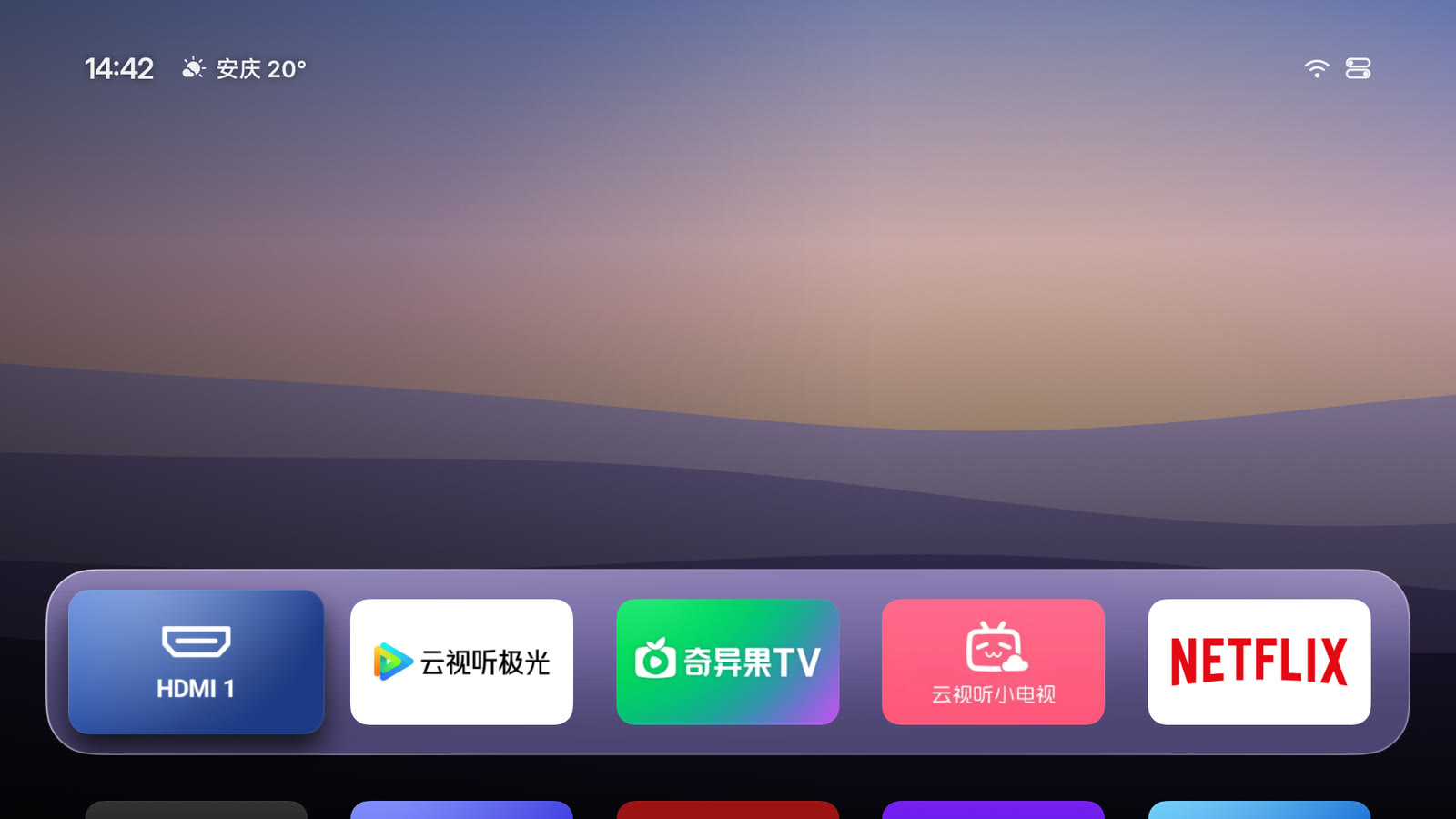
Aerial replaces the manufacturer's home screen with a simpler layout. A row of frequently used apps sits on a glass-style panel at the bottom of the screen, and the full app list is below it. Built-in system apps that manufacturers usually hide, such as Xiaomi's App Center and Mijia, still appear, according to the README.
To organise the screen, the user long-presses the OK button or presses the menu button. From there apps can be moved, grouped into folders, hidden or uninstalled. HDMI inputs pinned to the home screen can be assigned icons for devices such as Apple TV, PlayStation, Switch, Xbox or a PC, and renamed from a phone.
A control centre opens from the top-right corner when the user presses up from the first row. It gives access to input sources, network, settings, volume, brightness and personalisation.
How do the screensaver and wallpapers work?
The screensaver plays 114 aerial clips from Apple. The README says 4K and 4K Dolby Vision playback is used where the TV supports it. Users can switch to photos or a clock instead. Wallpapers come from Bing's daily selection, 14 built-in images, or photos sent from a phone by QR code. If the home screen sits idle for 10 seconds, the aerial video plays behind the tiles, and any key press returns to the current view.
The aerial footage is copyrighted by Apple and streamed directly from Apple's servers, according to the project's licence notes. The daily images come from Bing.
Why does it need to take over the TV?
According to the README, most China-market TVs recognise only their own home screen, and some clear third-party apps while in standby. Aerial works around this with an accessibility service. It switches back to Aerial whenever the original launcher comes to the front. The service checks only which window is in the foreground and does not read screen content. If the system clears Aerial, a notification listener is used to bring it back. The project states that it does not read notifications.
On native Android TV devices, the README says these workarounds are not needed. The user can set Aerial as the default home screen directly.
How do you install Aerial, and what should you expect?
The install guide is written in Chinese. The first step is to enable ADB debugging on the TV. The TV's IP address is listed under Settings, then Network. On the first connection, the TV asks whether to allow debugging, and the user should choose the option to always allow it.
The guide recommends a second step: give an AI agent that can run commands on a computer the install instructions. The README names WorkBuddy, Doubao desktop, Qwen desktop, Trae, Claude Code and Codex as examples. Phone apps and web chat cannot run the install. If the agent reports success, the output should include app.orchard.tv.
How is Aerial upgraded?
From version 1.32, the control centre shows a new-version prompt when an update is available. The user selects the download-and-install option and confirms in the TV's own installer. The guide says this was tested on Xiaomi and TCL sets, and settings are kept. If the TV blocks app installs, the user has to run the install command again. The upgrade page includes a QR code that copies the command for that TV. Versions 1.31 and earlier do not have this button.
Who is it for, and where does it fall short?
Aerial suits owners of Xiaomi, TCL and similar televisions who want a clean, ad-free home screen and are comfortable running a few ADB commands or asking an agent to do it. The README lists several models as verified. It also lists three models that install but do not start Aerial at boot: Vidda, Hisense and Rayneo's 鹤 6 2025 Ultra. Owners of these models should check the device notes before installing.
- The boot advertisement is played by the TV's firmware, and the guide says it cannot be removed.
- The original desktop and membership features remain in the app list.
- On Xiaomi TVs, ADB is turned off during standby. The KEEP_ADB=1 option makes Aerial reopen it, which is useful for upgrades.
- Some Skyworth users reported an INSTALL_FAILED_USER_RESTRICTED error. The guide gives a settings command to run before installing. This is a user report, not a confirmed fix.
- Windows users cannot run the bash installer and must use the individual adb commands in the guide.
Maturity is hard to judge from the source alone. As of 23 October 2026, the repository had 3,397 stars and 248 forks, according to the GitHub API. The latest release was v1.37, dated 23 October 2026, and the last commit was pushed the same day. That points to active maintenance, but the README does not describe a support policy or a list of known bugs.
Bottom line: If you own a supported Xiaomi or TCL television and can run an ADB command or an agent on a computer, Aerial is a low-risk way to replace the home screen. Check the verified device list first, and skip it if your model is one of those that does not boot into Aerial.
Source and verification: This article is based on the README of the GitHub repository pengchujin/aerial-tv, published on 22 October 2026 according to the source metadata. Repository figures for stars, forks, licence, main language, latest release and last commit come from the GitHub API as of 23 October 2026. The project describes itself as independent and not affiliated with Apple, Xiaomi or TCL. Its own claims have not been independently verified.
Frequently asked questions
Does Aerial work on any Android TV?
The README says Aerial is built for China-market TVs that ignore third-party launchers, and it lists specific verified models. On native Android TV, the user can set Aerial as the default home screen without the accessibility workaround.
Is Aerial free, and can it be removed?
Aerial is released under the MIT licence. The install command accepts a --uninstall flag, which restores the original launcher and removes Aerial.
Can I install Aerial from my phone?
No. The install guide says phone apps and web chat cannot run the install. A phone can scan the QR code on the upgrade page to copy the command for a computer or an agent.
Related: Awesome Reverse Engineering: A Curated Map of Tools and Courses · Android TV Cleanup with Claude Code or Codex: What to Know



Comments (0)