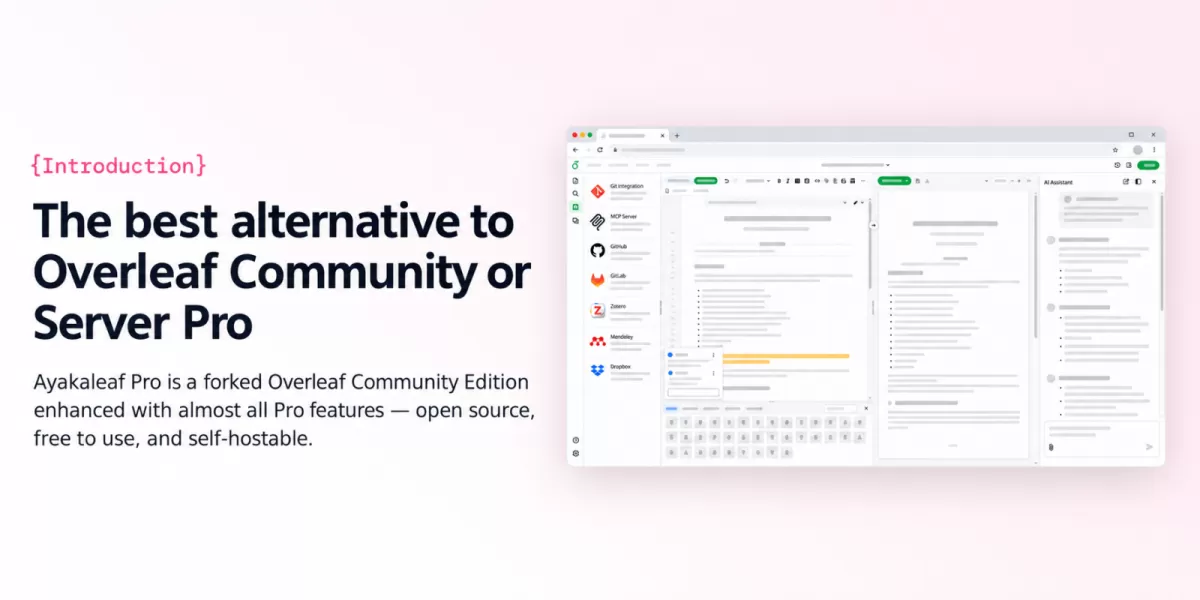
Ayakaleaf Pro is a free, open-source, self-hosted alternative to Overleaf Community Edition, the online LaTeX editor, according to the project's GitHub repository. The project, maintained by the ayaka-notes team, adds features such as single sign-on, an AI chat assistant, two-way Dropbox sync and track changes. Its maintainers state that it is not affiliated with Overleaf, Inc.
For researchers, students and teams who write in LaTeX, the appeal is a drop-in replacement that they can run on their own servers and extend in code. The repository describes Ayakaleaf Pro as an enhanced version of Overleaf with almost all of its features and capabilities.
What does Ayakaleaf Pro add to Overleaf?
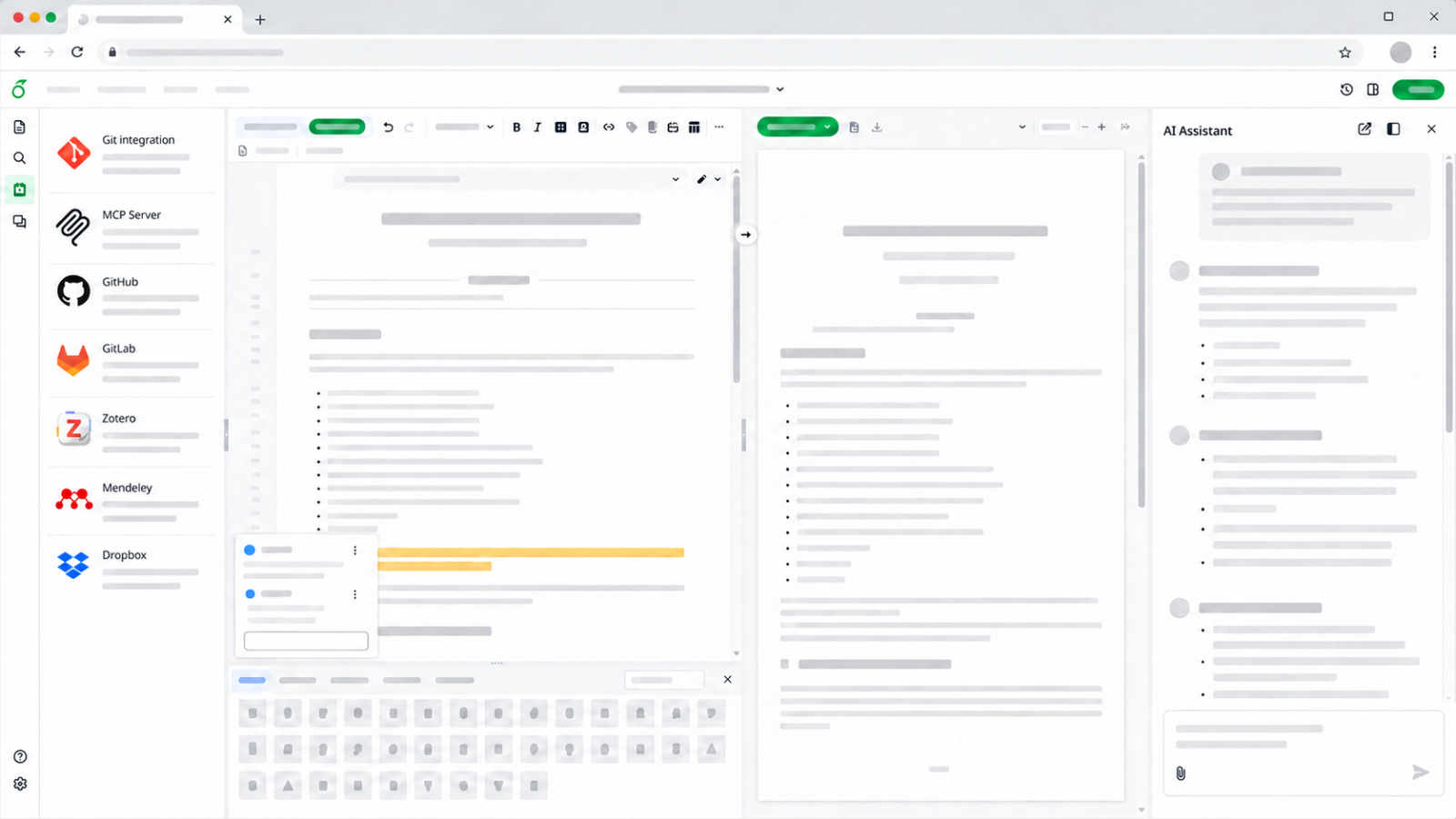
The repository lists a set of features that go beyond the standard community edition. Among them are two-way Dropbox sync, an MCP server that lets AI agents edit, compile and comment on projects, and an error assistant that explains and helps fix compile errors. The project also lists Pandoc import and export for Word, Markdown and LaTeX, plus a Python script runner for running Python inside a project.
Collaboration and version control form a second group. Ayakaleaf Pro offers two-way sync with GitHub, including GitHub Enterprise, and with GitLab, whether GitLab.com or a self-hosted instance. It also supports Git-Bridge for cloning, pulling and pushing with Git, along with full project history that can be restored or downloaded and a track changes panel with review and comments.
Which reference and writing tools are included?
Researchers who manage citations will find Zotero and Mendeley integrations, both with OAuth support. The project also offers advanced reference search across all of a user's bibliography entries. A symbol palette lets writers insert math symbols with one click, which can speed up work on equation-heavy documents.
How are compilation and administration handled?
Sandbox compilation supports a texlive-full image, and the project lists unlimited compile times that administrators can adjust in the admin panel. That panel manages users and projects globally. Self-registration is optional and can be limited to specific email domains, which matters for universities and companies that want to control who gets an account.
How can you try or deploy Ayakaleaf Pro?
There are two routes, depending on the goal. To test the software without setting up a server, the project offers a Playground built on a preconfigured GitHub Codespaces environment that runs in the browser. For production use, the repository points to detailed installation instructions on its Documents page and recommends installing with the ayaka-notes Toolkit.
- Try it: launch the Playground in your browser through GitHub Codespaces.
- Deploy it: follow the installation documents and consider the recommended Toolkit.
- Upgrade: check the Releases page for the changes between your current version and the target version.
The repository text does not list hardware or software requirements, so readers should confirm them in the documentation on the official website before deploying.
What is the project's licence and current status?
The code is released under the GNU Affero General Public License version 3, which the project describes as free to use and modify. According to GitHub data retrieved on 21 October 2026, the repository has 993 stars and 70 forks, and its main language is JavaScript. The latest release, pro-v6.3.1, was published on 18 October 2026, and the last commit was pushed on 20 October 2026.
Why does this matter for LaTeX users?
Overleaf is widely used for LaTeX work, and the repository notes that the commercial Server Pro Edition is offered by Overleaf, Inc., whose parent company is Digital Science. Ayakaleaf Pro takes a different path as an independent, self-hostable project. Groups that already run their own servers may value that control over where documents and compile jobs live.
The project's blog also lists two posts from August 2026, one titled as a look at Overleaf Server Pro pricing and an open-source alternative, and another on concurrent LaTeX compilation benchmarks. Institutions comparing a commercial licence with an open option will want to read those discussions alongside the source code.
Ayakaleaf Pro shows how a community project can extend a popular LaTeX editor while keeping it open and self-hosted. Readers evaluating it should start with the Playground, then review the installation documents and the AGPL-3.0 licence before committing to a deployment.
Frequently asked questions
Is Ayakaleaf Pro affiliated with Overleaf?
No. The project states that it is not affiliated with Overleaf, Inc. or its parent company, Digital Science, and that it is not Server Pro Edition.
What license does Ayakaleaf Pro use?
The code is released under the GNU Affero General Public License version 3 (AGPL-3.0), and a copy is included in the repository's LICENSE file.
Can I try Ayakaleaf Pro without setting up a server?
Yes. The project offers a Playground that uses a preconfigured GitHub Codespaces environment to run Ayakaleaf Pro directly in the browser.
Related: HortusFox 6.2 Security Update Fixes Four Medium Flaws · Free My TV: An Open-Source Ad-Free Home Screen for Smart TVs



Comments (0)