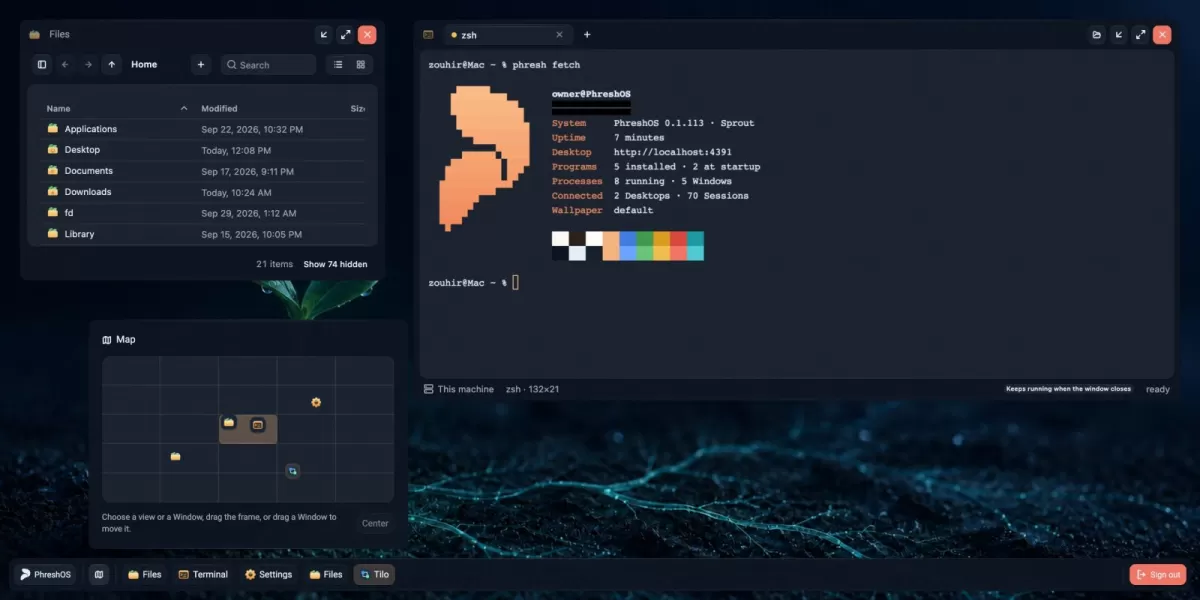
PhreshOS, a new open-source project published on GitHub, offers a self-hosted system for apps built with ordinary web technologies. According to its repository, the software runs on the machine where it is installed, keeps programs running there, and provides a Desktop that can be opened in a web browser. The project describes itself as experimental and says it is not yet ready for production use.
What PhreshOS is
Self-hosting means running software on hardware you control instead of relying on a provider's servers. PhreshOS applies that idea to a full working environment. Its repository describes two layers: the System, which is the service running on your machine, and the Desktop, which the System serves to your browser.
The distinction matters. Everything a user sees on the Desktop, including the file manager, the Settings panel and the wallpaper, is itself a Program built on the System. The System is the foundation underneath, and the repository says it is what this project contains.
Programs are written with web tools that developers already use. The project's goal is to let a Program contain only its own logic, while the System handles the surrounding infrastructure.
What the System gives each program
The repository lists several services the System provides to Programs:
- A place to run. A Program's server keeps running on the machine whether or not a browser is open.
- One sign-in. The owner signs in once to the System, and Programs do not need to manage accounts, sessions or connections themselves.
- Communication. Programs can send requests, publish messages and listen for events, both between their own parts and between different Programs, without configuring a transport layer.
- Permissions. The System decides what each Program is allowed to reach.
- Access from any browser. The Desktop can be opened from any browser that can reach the machine, and the same Programs appear as they were left.
The repository also notes that AI agents can work with the same Programs. Agents use a command line tool named phresh and software development kits, so they can operate alongside a person who is using the Desktop at the same time.
Getting started and platform support
The README offers two ways to try the project. The first is a live demo that provides a disposable Desktop for one hour, with nothing to install. The second is a local installation, which requires Node.js version 24.15 or newer on macOS or Linux.
Installing on macOS or Linux
The installation command sets up the System as a service for the current user, starts it, and prints the address of the Desktop, which is usually http://localhost:4300. The first visit creates the owner account. The repository refers readers to its Installation documentation for instructions on updating, stopping or removing the system, and on changing where it stores its data.
Windows support
Windows is not fully supported yet. According to the repository, the System installs and runs on Windows, but some Programs do not work there. Users on that platform should expect gaps until support improves.
How the system is organised
The System manages the running state of PhreshOS. That includes Programs and their processes, the server and client endpoints they run, communication between endpoints, services and Programs, authentication of the owner and of every connection, permissions, storage, uploads and logs, and the Desktop itself, including its windows, layers and appearance settings.
The browser displays this state but does not store it. A Desktop, a Node script and the phresh command can all reach the same System through interfaces defined in a shared package called @phreshos/core. This design means that changes made in one interface are visible in the others, because they all talk to the same running service.
Development and what comes next
Developers who want to work on the code need Bun 1.3 and Node.js 24.15 or newer. The development command runs the System from source, storing its data in a storage folder inside the repository and serving the Desktop from the first free port starting at 5300. An installed System uses a home folder at ~/.phreshos and ports starting at 4300, so both versions can run at the same time. Environment variables named PHRESHOS_HOME and PHRESHOS_PORT allow a different data location or port.
The source code is divided into three parts. The folder source/server contains the System, source/client contains the Desktop, and source/shared holds code used by both. The repository points contributors to a CONTRIBUTING file and asks anyone who finds a security vulnerability to report it privately through a separate SECURITY file.
For readers following open-source infrastructure, PhreshOS is worth watching as an experiment in packaging web applications as self-hosted programs. Its experimental status and partial Windows support mean it is not yet a drop-in choice for critical work. Its clear separation between the System and the Programs that run on it, along with the live demo for testing without installation, gives interested developers a low-cost way to evaluate the approach.
Related: Open-Source Port Brings Diablo II: Resurrected to iPhone and Mac · DS Bot: Long-Lived AI Bots Arrive for DeepSeek Harness


Comments (0)