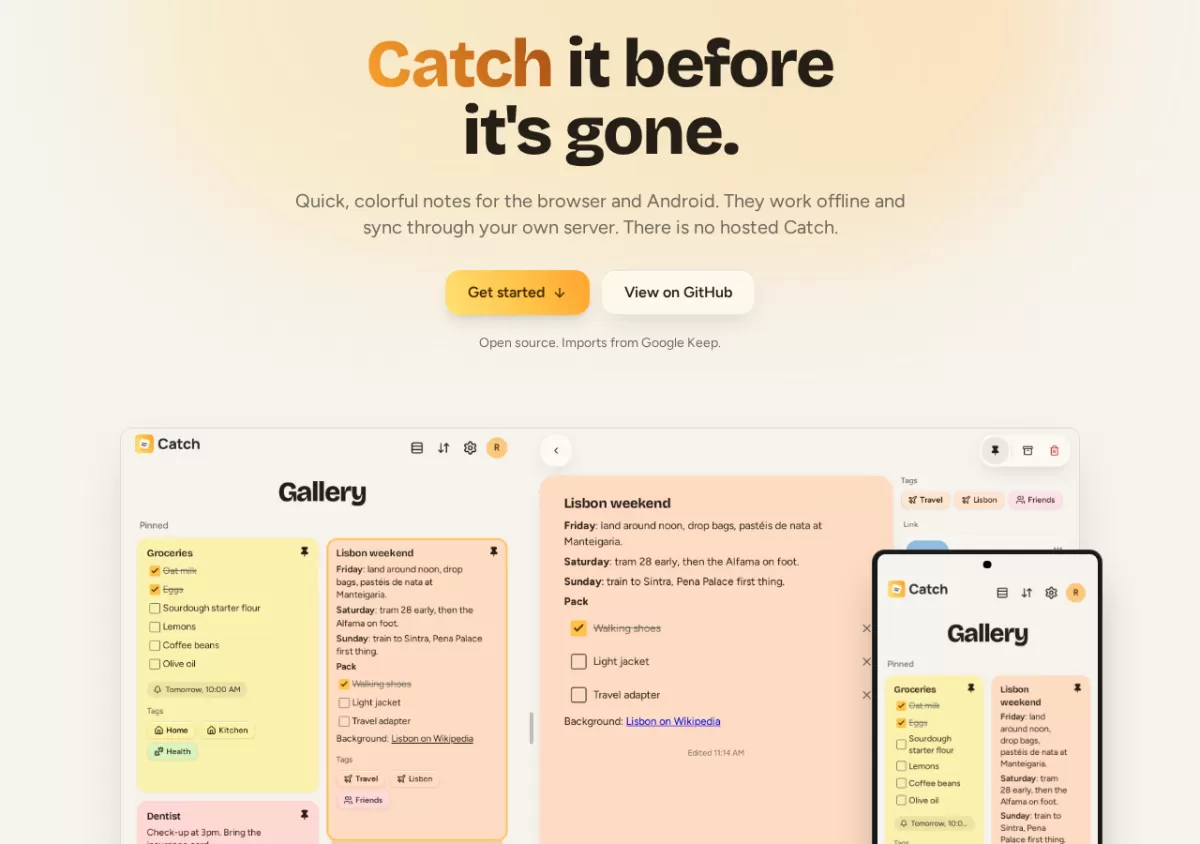
A new notes app called Catch is offering users a way to get the familiar feel of Google Keep without handing their notes to a company. According to Catch's own website, the app is designed to run on a server that the user owns, and there is no hosted version run by the developers. Catch works in the browser and on Android, keeps working without a connection, and syncs once a signal returns.
Familiar tools, with the server in your hands
Catch borrows heavily from the layout that many people already know from Google Keep. Notes appear as colorful cards, with eighteen colors and a row of pinned notes at the top. Checklists can be ticked off directly on the card, and notes can be archived or moved to the trash and restored later.
The difference lies in where the data lives. Notes are stored on the device itself, so they remain available offline. When the connection returns, they sync through a server that the user controls. For people who want a Keep-like experience without relying on a third-party cloud, that model is the main selling point.
Organizing and protecting notes
Beyond the basics, Catch adds several features aimed at heavier users. Tags can nest inside other tags, and a top-level tag can assign a color to every note beneath it. Reminders can repeat on a schedule, such as every weekday or on the second Tuesday of each month.
Private material can go into a vault. According to the source, notes and files in the vault are encrypted on the user's devices and protected by a separate password. The server and its backups hold only encrypted data, which means the operator of the server cannot read vault contents. Ordinary notes stay outside the vault and remain searchable in the usual way.
Sharing with a link
Notes can be shared through a read-only link that can include attached files and later updates. Users can also export a Markdown copy of the text. Anyone holding the link can read the note, so the sender decides when sharing ends by stopping the link.
Running it for a household or team
The server is deployed with a single Docker Compose file on a home server or a small virtual private server. The admin invites other people by link, and each person sees only their own notes. Backups can be created and restored from the Settings page, either manually or on a daily schedule. Administrators can also choose whether to follow stable releases, try preview builds, or stay on one version.
How Catch compares and how to move over
Catch's own comparison places it next to Google Keep and two open source alternatives, Memos and Notesnook, and it openly lists the trade-offs where rivals perform better. The product pages for each service were reviewed on October 7, 2026, according to the source, so readers should check current features before choosing.
For users with existing data, Catch offers an import path. Google Takeout can export Keep notes as a zip file. In Catch, the user opens Settings and then Data Management, selects the file, and reviews what the app found before confirming. The source states that the zip is read on the device and never uploaded. Running the import again skips notes that are already present.
Setting up your own server
- Download the Docker Compose file and the environment template from the project's GitHub repository.
- Fill in your server address and three secret values in the environment file, which the source says can be generated with a standard OpenSSL command.
- Start the service with Docker Compose and point your reverse proxy at port 3000.
- Create the first account, which becomes the administrator.
Users who prefer not to host the server themselves can open the address provided by whoever runs it and sign in with an invitation. On Android, the address is entered on first launch.
Catch is a niche tool, but it reflects a wider trend: people who want the convenience of mainstream apps increasingly ask for control over where their data is stored. Whether it becomes a common choice will depend on how easy self-hosting remains for non-technical users, and on how the project's development continues.
Related: NoteDiscovery Adds HTTP MCP Server for AI Clients · Termix: Free Self-Hosted Server Management Platform Built on Plugins


Comments (0)