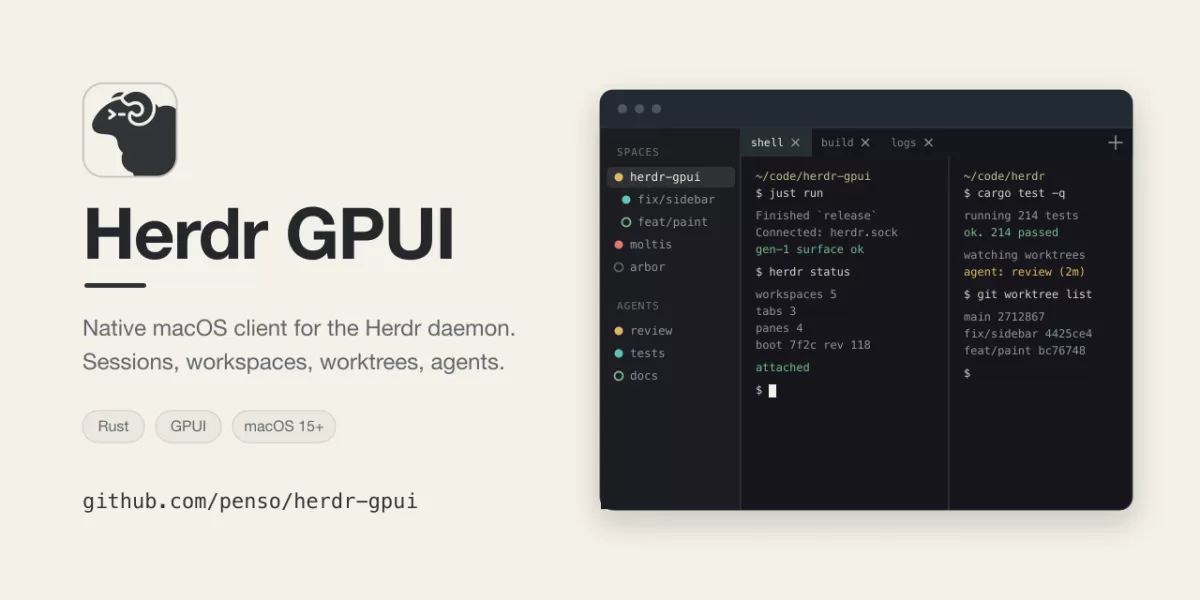
A new open-source desktop application called herdr-gpui is drawing attention among developers who run terminal sessions through Herdr. According to its project page on GitHub, the app is a native client written in Rust with the GPUI framework. It runs on macOS, Linux and Windows and connects to a Herdr daemon that the user has installed separately. The project states clearly that it is not affiliated with, endorsed by or supported by Herdr or herdr.dev.
What the client does
Instead of wrapping the terminal user interface or embedding another terminal emulator, herdr-gpui paints the terminal cells that the daemon sends it. Split panes are included. The approach means the window reflects the daemon's own layout and state, while the client handles the drawing and the input.
The main sidebar brings workspaces, Git worktrees and agents into one place. Each agent shows a status dot taken from the daemon, which signals whether it is idle, working or waiting for the user. Tabs and splits are drawn natively from the same cell data.
The project lists several additional features:
- Saved SSH hosts, with support for copying files
- Inline images and clickable links in the terminal
- Code navigation that jumps to a symbol, a file or a printed path and line number in the user's terminal editor
- File drops and editor groups
- System notifications, sounds and a Dock badge when an agent needs attention
The architecture also explains how the client relates to the daemon. The daemon owns the terminals and all session state. The GUI attaches to a binary client socket, renders what it receives and sends input back. Closing or detaching the GUI leaves the daemon and its terminals running, which means work in progress is not interrupted by closing the window.
Browser tabs are the one exception. Herdr has no browser panes, so web pages shown beside a workspace belong to the GUI alone. Agents running in the user's panes can open them with a dedicated command that reaches the running app over its own local socket.
Installing on macOS and Linux
On macOS, the simplest route is Homebrew. The project's README says the app requires macOS 14.2 Sonoma or newer and supports both Apple Silicon and Intel Macs. The cask installs a signed and notarized universal application. Once installed through Homebrew, the in-app updater hands updates back to Homebrew so that its records stay accurate. Standalone .dmg files are also published on the releases page.
Linux users have more choices. Each release provides x86_64 and ARM64 builds as a .deb package, an .rpm package, an Arch Linux package and a plain tarball. The packages require glibc 2.39 or newer, which covers Ubuntu 24.04, Debian 13, Fedora 40 and current Arch. A Vulkan driver for the user's GPU must also be present. On systems with a supported package manager, the in-app updater can verify a signed release and install it with a PolicyKit authentication prompt. The README notes that some older builds need one manual package upgrade before this support works.
The project also documents a source build path for users who prefer it. It pins Rust 1.96.1 and GPUI 0.3.6, and it offers a Nix flake for NixOS users. Beta builds are published as prereleases and can be opted into through the settings, though the README states that Homebrew installations always follow stable releases.
Windows support is still experimental
The README is direct about the state of the Windows version. It describes Windows as experimental and not a supported platform. Continuous integration checks formatting, lints the code and runs tests on Windows, but the project says that no native window, renderer or live daemon has yet been fully exercised on Windows. Some features, including saved SSH hosts, in-app updates and saved GitHub credentials, are unavailable on Windows and are reported as such inside the app.
Windows builds are distributed as zip files for x86_64 and ARM64. They are not Authenticode-signed, so Microsoft SmartScreen is likely to show a warning on first launch. These builds also do not update themselves, so users must download each new release by hand. The executable runs as a console application, which means launching it from File Explorer also opens a console window.
Performance claims and their limits
The project includes a performance report with a benchmark that uses a dense 160 by 50 terminal, 40 workspaces and 40 agents. On the developer's own M4 Max machine, the team reports that caching and background batching reduced release hover latency at the 95th percentile from about 51 milliseconds to 12 milliseconds. Scrolling time fell from 56 milliseconds to 14 milliseconds.
The README is careful to say what these figures measure. The benchmark covers CPU work from an input event to the constructed scene. It does not measure GPU completion or the time from pointer movement to what appears on screen. The figures come from one machine, and the project does not impose machine-dependent timings on its hosted tests. Readers should treat the numbers as a development benchmark, not a universal guarantee.
Outlook
herdr-gpui is an Apache-2.0 licensed project, and its license files include upstream attribution for the vendored protocol code. For users who already run Herdr, it offers a native way to see sessions, worktrees and agent activity without leaving a conventional desktop environment. Its clear statements about experimental Windows support and the limits of its benchmarks suggest a project that is careful about expectations. Whether it attracts a wider user base will likely depend on how quickly Windows support matures and how the project handles its growing feature set.
Related: Magic Hotspot: Connect Linux to an iPhone Hotspot · spotatui: Rust Terminal Music Player with Spotify, YouTube and More
Comments (0)