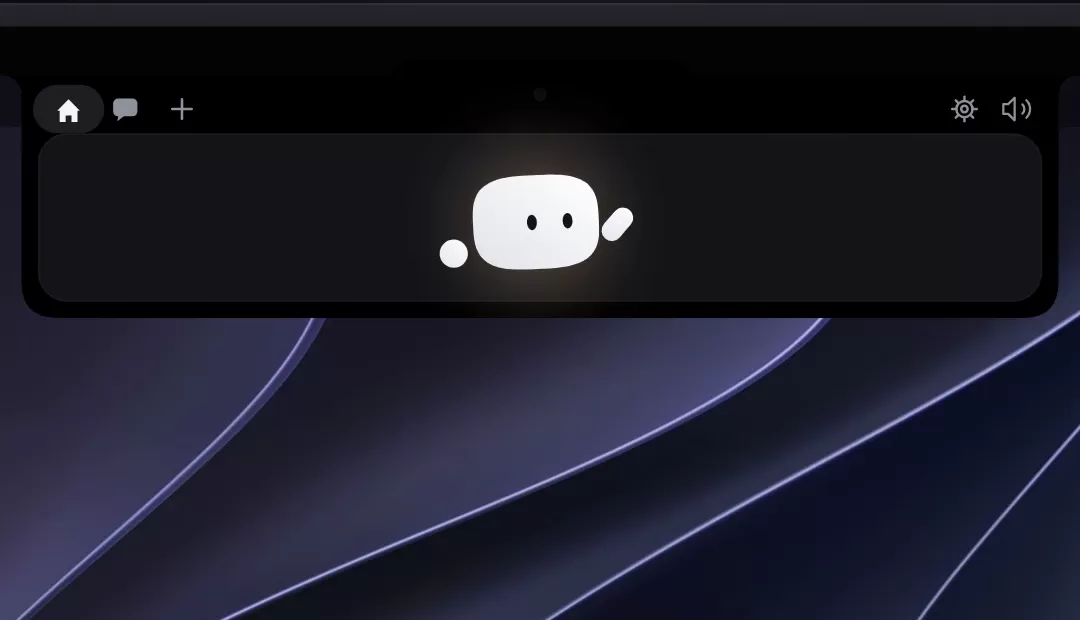
A small open-source tool called Coucou now lets developers keep track of their AI coding agents from the top of their screen, and increasingly from their phones. Published on GitHub under the MIT License, the project places a compact companion named Mochi in the notch of a Mac, or in a bar at the top of the screen on Windows and Linux. From there, it shows what agents such as Claude Code, Codex and Cursor are doing, and it can ask the user to approve actions without requiring a trip back to the terminal.
According to the project's GitHub repository, the app is designed for developers who run several coding agents at once and often step away from their desks while those agents work. The tool's appeal lies less in any single feature than in how many small interruptions it removes from a typical coding session.
What the app does on the desktop
On a Mac, Coucou sits in the notch and shows a live ticker of each agent session. Users can see which files an agent reads, edits or runs, step by step. When Claude Code edits a file, the ticker shows the file name and the number of added and removed lines, and a tap opens the full diff.
The app also handles permission requests. When Claude Code asks for approval, the notch offers Allow, Deny or Always. Questions that Claude asks through its interactive prompts appear as choices directly in the notch, including single and multi-select options. Users who prefer the command line can fall back to the terminal with a single click. Codex sessions also support Allow and Deny.
Other features focus on convenience. A user can drop a file onto the notch and either ask a question about it or send it by email, although the email function works only on macOS with Mail.app. Mochi can also leave the notch and float on the desktop as a small companion that reacts to alerts and returns to its place at the next launch.
Chat, usage limits and voice
Coucou includes a chat window that works with Claude, Gemini, OpenAI or a local model served through Ollama or LM Studio. Cloud providers require the user's own API key, while local models connect to a server running on the same Mac. The project also includes a voice assistant feature, called "OK Coucou," which uses Claude as its reasoning engine. According to the repository, speech recognition runs on the Mac, and only the user's words and the data needed to answer are sent to Anthropic, not audio.
For subscribers, the app can display Claude and Codex plan usage in the notch, covering the five-hour and weekly limits for Claude and the limits and remaining free resets for Codex. Some of these features are available only in the GitHub build rather than the Mac App Store version, which runs in Apple's sandbox and therefore omits Claude plan usage, the Apple Music pill and the ability to attach the front window to the chat.
Mobile companions
The most notable recent addition is the expansion beyond the desktop. The iPhone app, which the project describes as a companion to the Mac app, mirrors sessions, approvals and connected services. When a user locks the Mac while an agent is working, Mochi moves to the iPhone's Lock Screen and Dynamic Island, where the user can allow or deny a permission. Each approval requires Face ID, and the iPhone app supports notifications, widgets, Control Center controls and Siri shortcuts.
Sessions sync through the user's private iCloud database. The repository states that project names, commands and questions are encrypted with the user's iCloud keys, and that no Coucou server sees projects, commands or keys. Syncing requires enabling an option in the Mac app and signing in to the same Apple Account on both devices.
An Android version, built by developer Rhytam Biswas and listed in the repository under android/, extends the approach to phones. Approvals on Android require a fingerprint or screen lock to allow, although denying requires no authentication. The Android app connects to Coucou running on Windows or Linux over the same Wi-Fi network, not to the Mac version, and the repository says it has been tested on a real phone running Android 13.
Availability and setup
Access to the iPhone version currently runs through Apple's TestFlight beta, which the project describes as free but limited to 10,000 testers. The repository says a public App Store release is coming soon, and that Apple was still reviewing the beta at the time of publication. The Android app does not yet have a signed APK, so users must build it from source for now, and the project notes that Android 11 or later is required.
Setup on macOS is straightforward, according to the repository. Users download the latest zipped app from the Releases page, move it to the Applications folder and approve it when macOS asks for confirmation. Windows users face a warning from SmartScreen the first time they run the installer, because the installer is not yet code-signed. The repository notes that this warning is expected.
Why it matters for developers
The growth of AI coding agents has created a new kind of workflow problem. Developers now run multiple sessions that may pause for permission or a question at any moment, and those pauses can stall work for minutes or longer if nobody notices. Tools that surface these moments in the user's peripheral vision, rather than in a terminal window that may be buried under other windows, address that problem directly.
Coucou also differs from many commercial developer tools in its openness. The source code is available under the MIT License, and the repository invites users to fork it and learn from it. The Coucou name, Mochi and the sounds, however, remain the copyright of their creator, Louis Raillé, and the license in the repository sets out those terms separately.
The project is also gaining languages. The app is available in ten languages, including English, Chinese, Hindi, Spanish, Arabic, French, Bengali, Portuguese, Russian and Indonesian, and the maintainers welcome community translations. The app also states that it has no telemetry and no account requirement, with API keys stored in the macOS Keychain, Windows Credential Manager or Linux Secret Service.
Coucou will not suit every workflow. It depends on a particular set of agents and on Apple, Windows or Linux platform features, and some capabilities are limited to specific builds. Still, it shows how developers are beginning to build interface layers around AI agents rather than relying solely on the terminal. Readers who use these agents daily can explore the repository on GitHub to see whether the tool fits their setup.
Related: Reduce Claude Code Token Costs With optimAIzr CLI · Codex on Crack Lets You Mix Claude and DeepSeek Models in Codex

Comments (0)