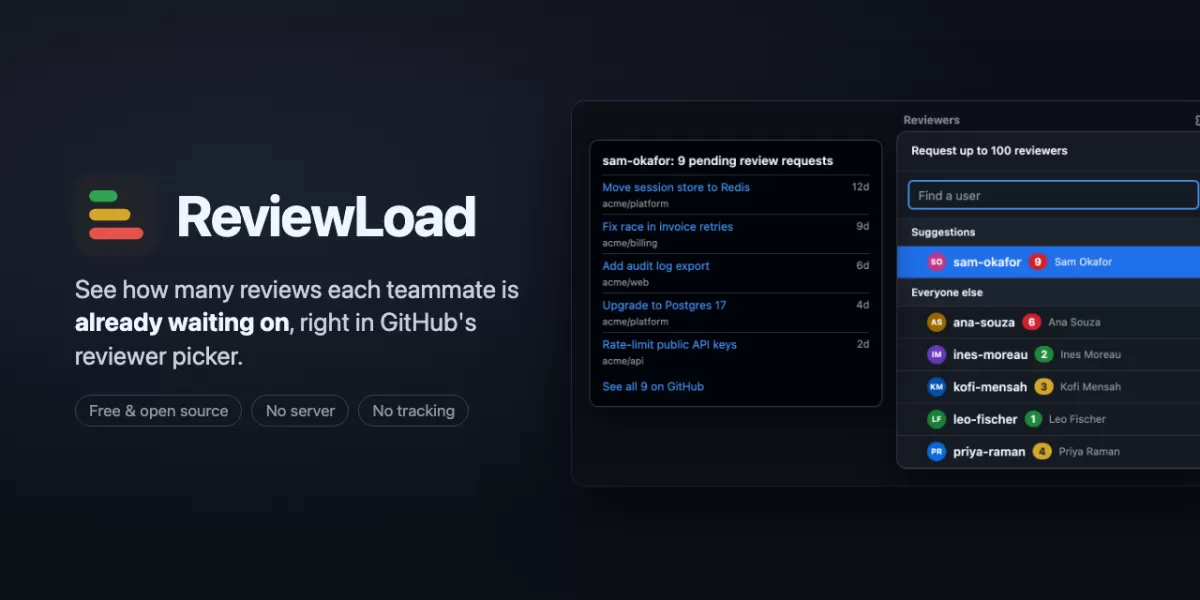
A browser extension called ReviewLoad lets developers see how many review requests each teammate is already handling, directly inside GitHub's Reviewers menu. According to the project's page on GitHub, the tool adds a small coloured badge next to each name, so whoever is choosing a reviewer can check workload before adding one more request. The extension runs in the browser and has no server of its own, which means it reads data only through GitHub's own search.
How the workload indicator works
When a user opens the Reviewers gear on a pull request, each candidate receives a pill showing the number of open pull requests currently waiting on that person's review. The count includes the pull request the user is looking at.
The colour moves from green to amber to red as the figure rises. The thresholds can be changed in the settings. Hovering over a pill reveals the five oldest requests waiting on that person, with links, along with a link to the full list on GitHub.
The same indicator also appears beside reviewers who are already attached to the pull request. That makes it easier to notice when a person who was just added is already overloaded. GitHub's description stresses that ReviewLoad only adds information. It does not request reviews, assign anyone or change anything on the platform.
Setting up a read-only token
ReviewLoad reads GitHub's search API using a personal, read-only token that the user creates. GitHub describes the setup as taking about two minutes. The extension provides a pre-filled token form that already sets a name, a 90-day expiry and read-only access to pull requests.
Users then set the resource owner to their organisation, choose all repositories, and paste the token into the extension's pop-up. A confirmation reading "Connected as" followed by the user's name indicates that the setup has worked.
Some organisations require an owner to approve fine-grained tokens before they function. Until approval, counts may show as zero or be missing. Organisations that use single sign-on are directed to a page where the token can be authorised. Because a fine-grained token covers one organisation or a personal account, people working across several must either create a token for each or use a classic token with the repo scope. GitHub points out that a classic token also grants write access, so fine-grained tokens are preferred where possible.
What gets counted, and what does not
A person's figure covers open pull requests in the same organisation as the current one. Users can narrow this to the same repository. Only requests made directly to an individual are counted. GitHub removes a request from the count once that person submits a review, and a new request brings the pull request back.
Team requests are excluded by default. GitHub's reasoning is that a request sent to a 12-person team would add one to the count of all 12 members. Users who deliberately use team requests can switch them on.
The figures have several limits that readers should understand:
- Each user sees only what their own token can access, so two colleagues may see different numbers for the same teammate.
- GitHub's search can take a few seconds to register a newly added reviewer. ReviewLoad rechecks shortly after the sidebar changes.
- Numbers are cached for five minutes. Older figures appear faded, for example while GitHub asks the extension to slow down.
Why the design avoids turning reviewers into metrics
GitHub frames the tool as a way to protect busy reviewers at the moment someone chooses who to ask. The extension deliberately omits leaderboards, historical data, charts and exports. Every number it shows is already visible to anyone with repository access through GitHub search. The difference is that the figure appears where the decision is made.
Privacy is another part of the design. The token is stored in the browser's local extension storage. It is not synced between devices and is not encrypted at rest, which is why GitHub advises using a read-only token with an expiry date. ReviewLoad communicates only with GitHub's API domain, and it includes no analytics, error reporting or third-party servers. Its permissions are limited to storage, access to GitHub pages so the pills can be drawn, and access to the API so counts can be made.
Code review is a common bottleneck in software teams, and when requests cluster on a few experienced engineers, pull requests can stall. Tools that make workload visible at the point of assignment address that problem without changing how the team's processes work.
Limits and what comes next
GitHub's FAQ says that opening the picker sends a handful of small GraphQL requests, each costing about one point against GitHub's hourly budget of 5,000 points. Because results are cached, reopening the picker within the cache window adds no further cost.
The extension does not yet support GitHub Enterprise Server, and that support is the first planned addition after version 1. A Firefox listing is also still under review. Users who already rely on GitHub's team auto-assignment can run ReviewLoad alongside it, because auto-assignment applies only when a whole team is requested and does not show individual workloads.
For teams that pick reviewers by hand, the extension offers a simple check that costs little to install. Its main value lies in the moment before a request is sent, when a quick look at the numbers can prevent a reviewer from being overloaded.
Related: Open-Source n8n Bot Calculates Czech Tax on Broker Investments · Software License Renewal Tracker Sends Timely Reminders



Comments (0)