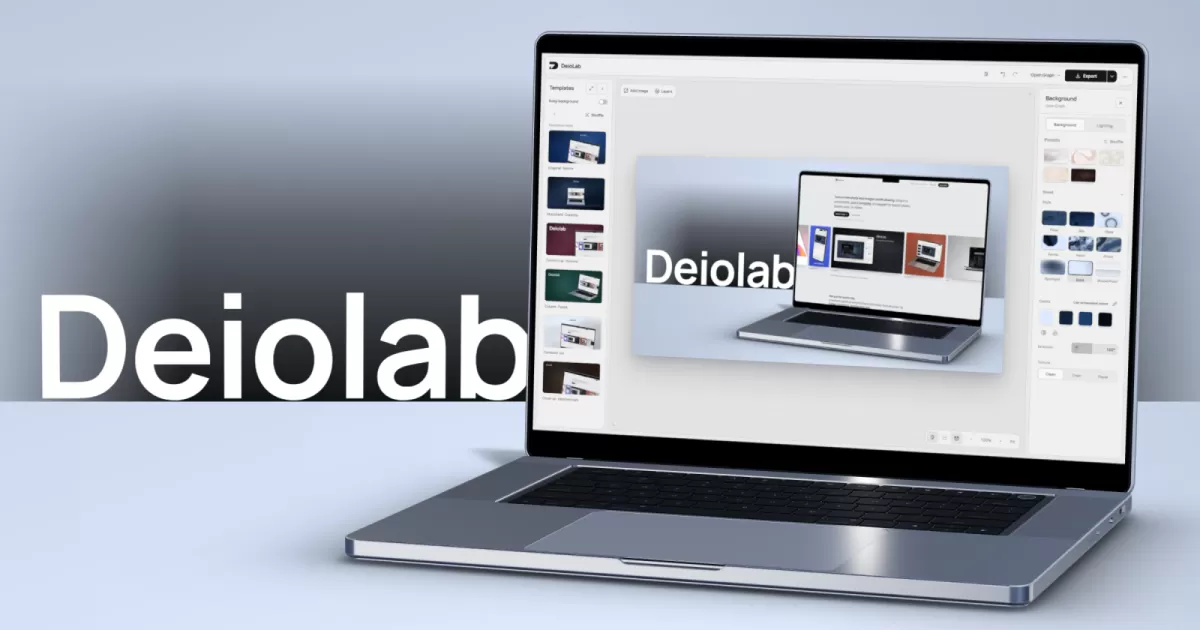
DeioLab, a free online screenshot editor, lets users turn ordinary screen captures into polished images for launch posts, social cards and presentation slides. According to the tool's website, users can drop in a screenshot, choose a template and export the result without creating an account. The editor adds frames, backgrounds and lighting, and it runs in the browser, where the images stay on the user's own device.
What the tool does
Plain screenshots often look unfinished when they appear in a product announcement, a pitch deck or a social media post. DeioLab, as described on its website, is designed to fix that gap. It wraps a capture in a frame, places it on a backdrop and resizes it for the platform where it will appear.
The site describes three main styling options. Users can keep the screenshot clean, or place it inside a browser window, a MacBook or an iPhone outline. They can also generate a background, try another one, or pick colors taken from the screenshot itself. Pattern and texture controls allow further adjustment until the look suits the content.
Lighting and motion
The editor includes a lighting panel. Users can choose soft, warm or cool light, move its direction, and adjust brightness, reflections and shadows. These controls are meant to give device mockups a more realistic, photographic feel without requiring design software.
DeioLab also supports moving screens. According to the website, users can work with screenshots and screen recordings and export them as MP4 files, which suits demonstrations of an app's interface in action.
How the workflow runs
DeioLab's site presents the process as a short sequence of steps. The user pastes, drops or captures an image, selects a starting layout and adds a background and lighting. The final stage is choosing output sizes. Each shape has its own layout, so one design can be adapted for several formats.
The export options are a central part of the pitch. The website lists PNG files at 1x or 2x resolution, a transparent cutout of the device frame, one PNG per layer, a ZIP archive containing several sizes, and MP4 for animated screens. The layer export matters for designers who want to finish the work in another application.
- Images and transparent device cutouts for web and print use
- One PNG per layer for further editing elsewhere
- A ZIP archive when several sizes are needed at once
- MP4 files for screens that move
Access, privacy and device support
Two points stand out in the company's own description: cost and data handling. DeioLab states that the editor is free and that users can start immediately, with no account to create. It also says that uploaded images are not sent to a server. Instead, they remain in the browser and are saved on the user's device, so a person can close the tab and return to the project later.
The editor is also built to work on phones and tablets, according to the site. The company notes, however, that a laptop offers the most working space. That detail is worth keeping in mind for anyone planning to make detailed layouts on a small screen.
Why the category is growing
Visual packaging has become a routine part of software marketing. Teams that once relied on designers for every product image now often need many versions of the same screen for different channels, from app store listings to short social clips. Tools that remove the manual work of framing, sizing and lighting can save time for small teams and solo creators who lack a design budget.
DeioLab's approach sits within this trend. Its focus on templates, fixed output sizes and layer export suggests it is aimed at people who already have the screenshots and need a fast way to make them presentable. Whether the tool becomes a regular part of a publishing workflow will depend on how well its controls handle complex layouts, which is a question for hands-on testing rather than the product page alone.
What to watch next
The information available so far comes from DeioLab's own website, and it describes features and policies rather than independent measurements. Readers evaluating the tool should check its output quality, export settings and browser performance with their own material before relying on it for a commercial launch.
Even so, the core offer is clear: a free, account-free editor that keeps files on the user's device and produces mockup-style images and short videos. For creators who need presentable screenshots quickly, that combination is likely to attract attention in a crowded field of design tools.
Related: Open Source Newsletter App MailCheap Lets You Self-Host for Free · Iosevka Font: Slender Monospace Typeface for Code and Writing



Comments (0)