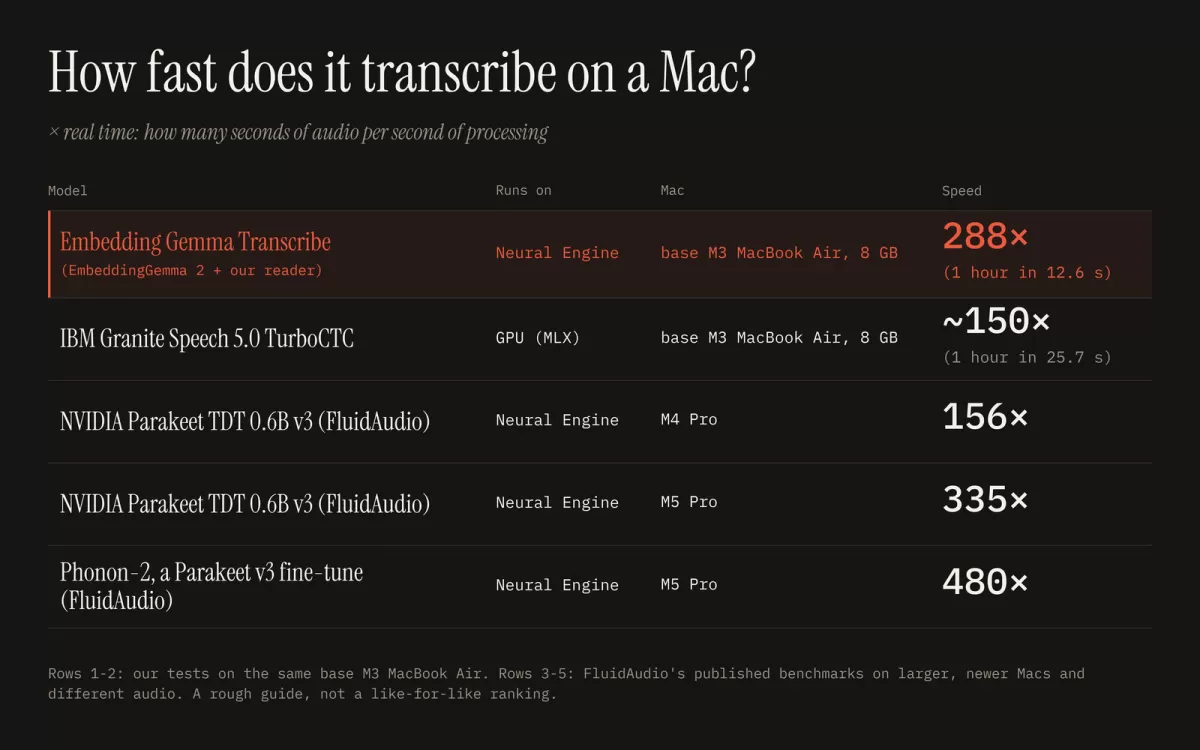
A developer project published on eg2.haku.sh has shown that Google's EmbeddingGemma 2, an embedding model normally used to compare meaning across text, images, audio and video, can be repurposed to transcribe speech. According to the source, an hour of audio can be processed in about 13 seconds on a base MacBook Air, entirely on the device. The project's authors say the approach currently trails leading speech models on accuracy, but they see clear room for improvement.
Can an embedding model transcribe speech?
Embedding models convert inputs into numerical vectors placed in a shared space, so that items with similar meaning sit close together. EmbeddingGemma 2 is multimodal, meaning it places text, images, audio and video in one common space. The source describes a simple intuition behind the experiment: if you say a word out loud, its audio representation should land near the written form of that same word.
The team tested whether it was possible to read words directly out of that space. Instead of building a speech recognizer from scratch, they tried to find the nearest written word for each sound, treating the model's existing structure as the starting point.
How the system works
The design keeps most of the original model intact. According to eg2.haku.sh, the audio encoder of EmbeddingGemma 2 is left exactly as it is. What changes is the layer that sits on top of it.
The pipeline works in several steps:
- A small component called a reader maps each short slice of audio into the model's text space.
- The system compares that position against a vocabulary of roughly 229,000 English words and picks the closest match.
- The matched words are strung together to form a transcript.
- A separate, tiny model adds punctuation and capital letters.
Only the reader is trained. The source states that training took under two hours on 8 H100 graphics processors, using openly licensed English speech. The base model itself was never trained for speech-to-text, which is what makes the result notable: the reader learns to bridge an existing representation rather than the whole model learning a new task.
Why the approach is efficient
Because the heavy audio encoder is reused unchanged, the added training burden is small. That is the main reason the source gives for calling the project a rough proof of concept rather than a full recognition system. A better-trained reader is the obvious next step.
How fast is it?
Speed is the headline figure. The source measures performance in multiples of real time, meaning seconds of audio processed per second of computing. Two of the reported rows come from the project's own tests on the same base M3 MacBook Air. Three further rows cite published benchmarks from FluidAudio, which were run on larger, newer Macs and on different audio, so the source warns they are a rough guide rather than a direct ranking.
Even with those caveats, the headline result is that a laptop-class machine can handle an hour of recorded speech in well under a minute. For journalists, researchers and students who regularly work through long interviews or lectures, that kind of turnaround would be a practical gain.
Where accuracy stands
Speed comes with a trade-off. The source puts the current word error rate at about 5%, compared with 2 to 3% for leading speech models. Word error rate is the standard measure of transcription accuracy: it counts the substitutions, deletions and insertions needed to turn the machine output into a correct transcript. A gap of a few percentage points may be acceptable for quick notes but could matter for legal, medical or published quotations, where every word needs checking.
The project's authors believe a better-trained reader can close that gap. They describe it as the next iteration of the work, which suggests the current version should be seen as a first step rather than a finished product.
How readers can try it
According to eg2.haku.sh, the tool offers two ways to use it. Users can drop in an audio file for transcription, or hold the Right Option key, speak, and release it to dictate text into any application. The system runs on the Mac's Neural Engine, the dedicated processor for machine learning tasks built into Apple silicon.
The source emphasises privacy as a central feature: the audio never leaves the machine. For users who handle confidential interviews, internal meetings or personal recordings, local processing removes the need to upload files to a remote service.
The project is a useful reminder that general-purpose AI models can often be adapted to new tasks with modest additional training. Whether this approach can match the accuracy of dedicated speech systems remains the key open question. If the next version narrows the word error rate gap while keeping its speed, on-device dictation built on an embedding model could become a realistic option for everyday use.
Related: DigUp Lets You Search Mac Files by Content, Not Just Names · Pulse Local Keeps Your Budget Chat on Your Own Machine






Comments (0)